
Sparrow for Excel
From laptop to data lake, the workbook never changes.
One workbook.
One formula language.
One refresh button.
Shown in the demo: EnergyScope — the flagship Sparrow deployment.
New — the EIA Data Edition
A free, ready-made deployment for US energy data: the add-in with 130,391 EIA petroleum series bundled, the weekly tables EIA retired rebuilt as sheets, and one-click Update EIA — no Python, no account, no server. Free download, signed installer.
Write formulas, not SQL
=ES.Get("PET.WCESTUS1.W")
=ES.Table(ids, "2020-01-01")
=ES.Catalog("PET.WDIST*")
Sparrow makes datasets behave like Excel functions. No imports, no drivers, no database setup — a series ID in a formula, data in the sheet, and a refresh button that keeps it honest.
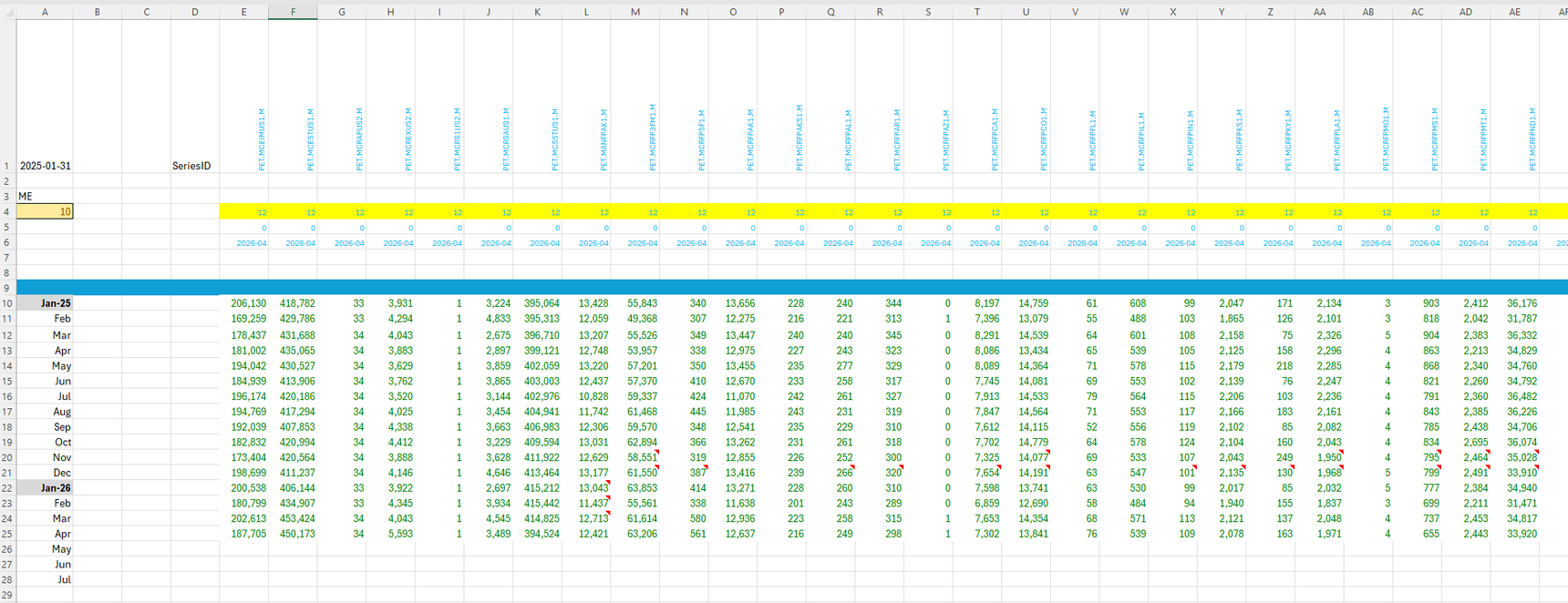
A real page from the flagship deployment — 40+ series, month-end grid, change counters, and the red corner marks are tracked revisions.
The sheet that builds itself
=ES.Table(1:1, "2015-01-01", , "ffill", "ME")
=ES.Name(1:1)
=ES.Units(1:1)
Point a table at an entire row and that row becomes a live series list: type an ID, get a labelled, dated column — before your hand leaves the keyboard. Leave gaps as reserved slots; fill them whenever. Names and units align themselves underneath. A working dashboard is a header row you type into.
Or skip typing entirely: the New Sheet menu builds complete styled analyst pages — parameters with dropdowns, change tracking, a catalog browser — from page designs that are just JSON files. Design a page once; everyone gets it in one click.
A folder of self-describing datasets
A Sparrow dataset is just files in a folder — on your PC, a network
share, a static website or an S3 bucket. Drop NEWTHIS.vortex
into the folder and =ES.Get("NEWTHIS.…") works. No
registration, no restart. The folder carries its own catalog, so search,
names and units work with no server anywhere.
When your team outgrows files, point the same workbook at a live server — authentication, live pushes, server-side analytics. The formulas don't change. The format is an open specification.
It tells you when the world changed
Open the workbook — if the source has new data, the ribbon lights up. Every 30 seconds it re-checks, unattended, even when the “source” is a read-only folder. Refresh marks exactly the new values and flags revised ones with before/after comments. Real data gets revised; your spreadsheet should admit it.
Early access
Sparrow for Excel is in private early access. Leave your email and we'll get in touch — analysts and dataset publishers especially welcome.
One workbook.
Any dataset.
Anywhere.
Choose where your data lives. Not how your analysts work.